


Verification doesn’t need to leave the device. And once it doesn’t, the economics of verification change as much as the privacy model. In fact, most identity verification sends the image to a server, waits for an answer and sends the result back. That introduces a network round trip and means a photo of someone’s face travels across the internet every time they prove who they are.
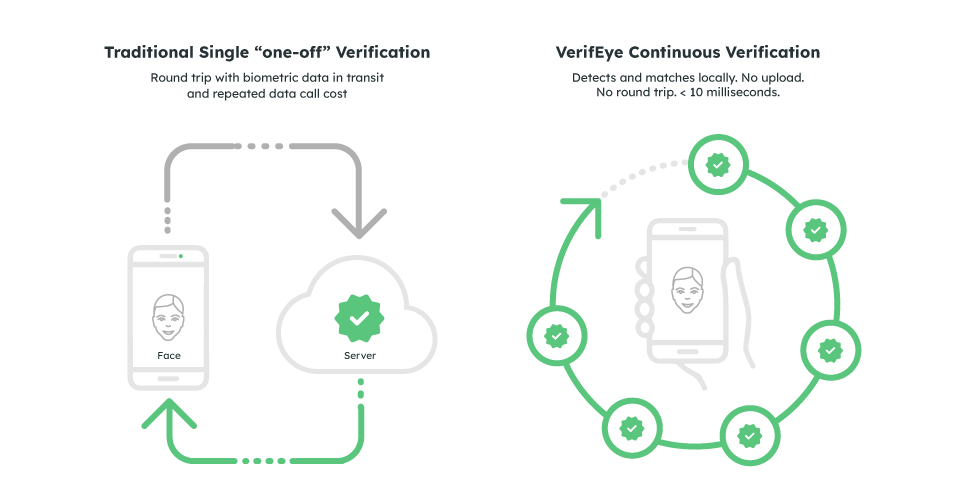
VerifEye starts from a different premise. If verification runs on the device itself (no upload, no round trip) it can be both faster and more private, because the two problems share a root cause. The biometric template is created and matched on the device and never transmitted. That’s what removes the risk: server round trips are what make verification slow, and they’re also what put biometric data in transit and in someone else’s infrastructure. So fix the architecture, and both problems shrink together.
“The industry treats privacy and speed as a trade-off. On-device architecture is the proof that they’re actually the same problem.”

Benchmarks: Face Verification on Qualcomm and Apple NPUs
It’s easy to claim to be the fastest. Realeyes’ engineering team publishes the numbers instead. Section 7.2 of the Realeyes Face Verification whitepaper benchmarks the two components of the pipeline (face detection and face embedding) across precision levels on real consumer hardware: a Samsung S24 (Snapdragon 8 Gen 3) and an iPhone 15 (Apple A16 Bionic).
Put simply, the headline number is the shift from general-purpose CPU to a dedicated on-device accelerator:
| Configuration | Face detection | Face embedding | Total |
|---|---|---|---|
| Server CPU, single core (baseline) | 17–20 ms | 55–88 ms | ~72–108 ms |
| On-device CPU, FP16 | 12.9–23 ms | 35.1–49 ms | ~48–72 ms |
| On-device accelerator (QNN / CoreML), INT8 | 2.8–6.7 ms | 2.7–3.0 ms | ~5.5–9.7 ms |
| ms = millisecond | |||
Routing inference to the phone’s own NPU, Qualcomm’s Hexagon via QNN on Android, Apple’s Neural Engine via CoreML on iOS, is what does the real work. Specifically, the embedding model alone drops from 55–88 milliseconds on CPU to under 3 milliseconds on the accelerator. That’s the step that turns a verification check from something a user waits for into something that just happens.
Those server figures are compute only. A real cloud check also pays for the round trip: TLS, request queueing and the return leg. Notably, that’s usually the largest part of the total and the only part a user notices. On-device, the line item doesn’t exist.
Why Speed Compounds on Battery-Powered Devices
The interesting difference isn’t whether a single check takes 100ms or 2ms. It’s what that reduction makes possible on the device itself.
The Constraint That’s Now Gone
Mobile phones and especially battery-powered cameras, smart glasses, video doorbells, body cameras and access-control sensors have never been able to run face recognition continuously.
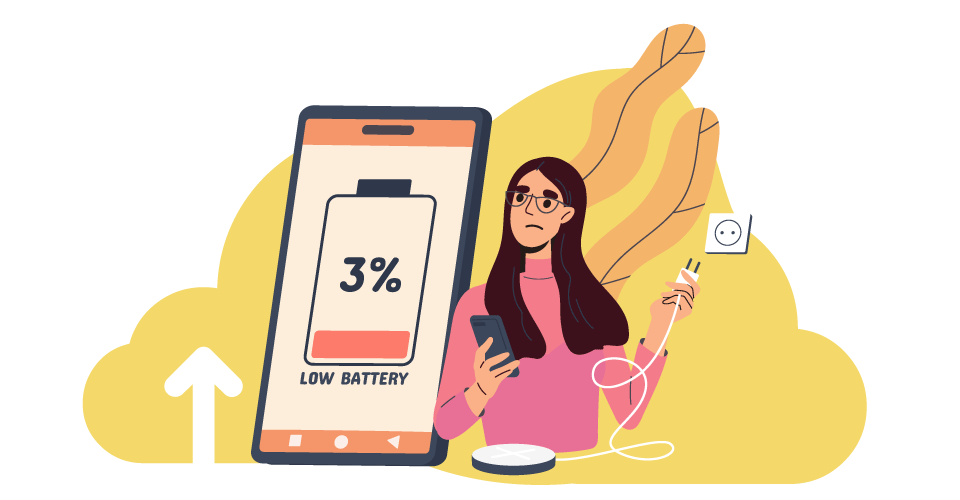
Server round trips were too slow and too battery-intensive to repeat every few seconds. Running recognition locally on general-purpose CPU cost too much power to sustain either. That constraint capped these devices to occasional, deliberate checks: one verification at one moment, then nothing until the next explicit request.
“A check that costs nothing can run on every face, so the ones without consent are blurred out before anything is ever stored.”
VerifEye’s sub-10-millisecond, on-device inference removes both halves of that constraint at once. It’s cheap enough in latency and power draw to run continuously instead of once, which turns verification from a single gate into an ongoing state. As a result, that opens categories of deployment that weren’t previously possible:
VerifEye’s sub-10-millisecond, on-device inference removes both halves of that constraint at once. It’s cheap enough in latency and power draw to run continuously instead of once, which turns verification from a single gate into an ongoing state. As a result, that opens categories of deployment that weren’t previously possible:
Four New Categories of Deployment
- Frequency: at 70–100ms and a network call, verification is something a device does once, deliberately, at the start of a session. Under 10ms and locally, it can run continuously without the user noticing at all.
- Energy: a cloud check spends most of its energy waking the radio, not moving the image. That cost is largely fixed, so it doesn’t shrink with the image, and it’s paid again on every check. Local inference on an accelerator has no such floor.
- Consent: a check that costs almost nothing can run on every face to protect the people who haven’t consented, not to track the people who have. A camera matches each face against the small set of enrolled, consenting people, then automatically blurs or discards everyone else in the same frame before anything reaches storage. That’s what privacy law already requires in many jurisdictions.
- Device class: once a check costs almost nothing in time or power, the set of hardware that can afford one expands. For example, doorbells, wearables, body cameras and access controls were excluded from continuous recognition by the cost of each check, not by the difficulty of the recognition.
Together, these change what verification is. It stops being a gate at the start of a session and becomes a property that holds throughout it. A device can know not only that the right person started the session, but that the right person is still there.

Not Every Check Needs the Same Precision
Maximum precision isn’t necessary for every check and dialling it back costs far less accuracy than it sounds. Different use cases call for different confidence thresholds, so customers can match speed and model size to the risk in front of them, with a real-world accuracy gap that’s barely measurable. Think of it like image resolution: a billboard needs full detail, while a thumbnail doesn’t need nearly as much to remain recognizable. The whitepaper documents three versions of the same underlying model, each trading a bit of precision for speed and size:
Three Precision Tiers
- FP32 (full precision): the most exact version of the model (the “billboard” setting). Used where compute is generous and every fraction of accuracy matters, typically server or on-premises deployments.
- FP16 (half precision): roughly half the size and twice as fast as FP32, and tested at a 0.996 similarity score against the full-precision output (1.0 being identical), a gap too small to affect real-world accuracy. Consequently this is the default for most on-device deployments.
- INT8 (compressed, running on the phone’s own accelerator): the smallest and fastest version, as little as 42 MB for the embedding model, running in under 3ms. However, the trade-off is that it needs extra tuning per device to hold onto that accuracy.
Matching Precision to Risk
That range matters because not every use case is asking the same question. Indeed, a financial re-authentication needs a tight, high-confidence match. That’s a job for FP32 or well-tuned FP16. But confirming someone is clearly over 18, or clearly not a bot trying to farm survey rewards, doesn’t need the same bar.
“…not every use case is asking the same question. A financial re-authentication needs a tight, high-confidence match.”
Those are coarse, high-confidence-at-a-glance decisions. Customers can deliberately run them on the fastest, most compressed configuration, without over-engineering accuracy the use case never asked for. Speed becomes a dial customers turn to match the actual risk in front of them, not a fixed cost everyone pays regardless of need.
What This Changes for Privacy and Device Makers
On-device deployment used to mean a trade: privacy at the cost of speed. Sub-10ms end-to-end on standard consumer hardware removes it. For anyone shipping a camera, though, the more useful question is what the architecture does to the compliance surface.
Consent obligations don’t move. Illinois’ BIPA, Texas’s biometric statute and the EU’s GDPR Article 9 regulate the collection of biometric data wherever the template is computed, and no architecture changes that. Instead, what changes is everything downstream.
Nothing is transmitted. Nothing is handed to a third-party processor. Templates can be ephemeral, which turns retention and destruction from a policy you have to evidence into a property of the design. And the duty to keep biometric data secure applies to a far smaller surface, because there’s far less of it. In short, that’s data minimisation and privacy by design, engineered in rather than promised in a policy document.
The result is a smaller data-processing surface: fewer transmissions, fewer third-party processing dependencies and less biometric data to retain and secure.
“Nothing is transmitted. Nothing is handed to a third-party processor.”
Ultimately, the significance of sub-10ms verification isn’t that a single identity check gets faster. It’s that verification becomes cheap enough to run continuously, locally and privately, even on devices that couldn’t afford it before.
See the Full Benchmarks
Section 7.2 of the Face Verification whitepaper has the per-device latency tables, model footprints and the supported chipset list, measured on Snapdragon and Apple silicon.
Building on Constrained Hardware?
VerifEye isn’t locked to Snapdragon and Apple silicon — the same on-device pipeline can be tuned and customised for any comparable NPU or accelerator on the market. The native SDK documentation and platform matrix are at verifeyedocs.realeyes.ai, and our engineers are happy to talk through your power and memory budget.